TESTING AREA for teachers - real service at plus.tuni.fi
CSS: SWOT
Exercise instructions
Download and extract the exercise template to your local directory:
Then implement the following style definitions:
Create a CSS file named
style.css. The file must be located in the same directory ash3.html.Add appropriate class definitions in
style.cssand modify thebodyelement (and related classes) so that thedivelements are positioned exactly as shown in the figure below.All
divelements must use the following border definition:
border: 1px solid blue;This exact border style is also used in the automated tests. (Note: by default, border width is added to the element width.)
Each of the four
divelements (A, B, C, D) must occupy exactly one quarter (1/4) of the viewport area (100vw×100vh).
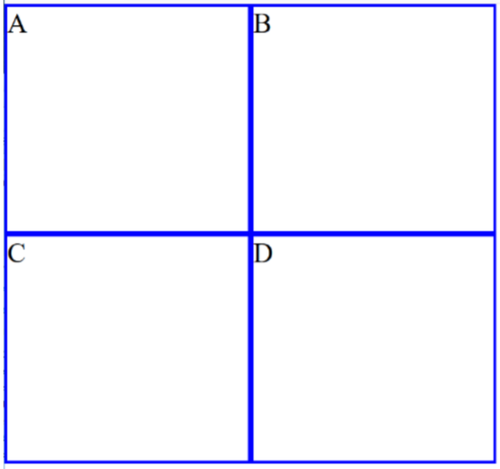
When specifying widths and heights, you must use viewport units:
vw  Relative to 1% of the width of the viewport
vh  Relative to 1% of the height of the viewport
The W3C definition of the viewport is:
The viewport is the user’s visible area of a web page. Its size depends on the device being used — for example, it is smaller on a mobile phone than on a desktop monitor.
For more information, see: W3Schools: CSS Viewport Units.
Attention
DON’T edit the h3.html file
A+ presents the exercise submission form here.